Virtual Reality Interactive Application Development: A Beginner’s Path
Virtual reality interactive application development is the work of building 3D software that reacts to a user's movement, gaze, and controller input in real time. A beginner's path has three steps. First, learn a 3D engine such as Unity. Second, build small projects that respond to user actions. Third, connect those projects to real data or equipment, such as a programmable logic controller (PLC) on a factory line. I wrote this guide for schools, engineering teams, and training providers in the United States who want a clear starting point, a fair way to compare options, and a realistic budget plan.
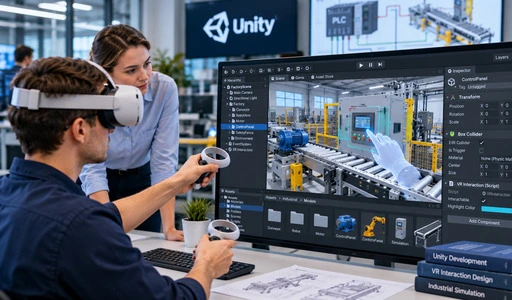
Understanding Virtual Reality Interactive Application Development
What These Applications Are
There is a virtual reality interactive application that lets people change a 3D scene while they are in it. Simple interfaces have a mouse and flat choices. In a VR app, the user's head and hands can move in six different ways. This lets them move around a machine, turn a dial, or grab a lever. Every second, the scene is drawn over many times to make sure it fits every move. You really feel like you're there when that response keeps coming back. Even better, lag or frames that move too slowly can ruin the effect and make people sick.
How Hardware and Software Work Together
A headset holds the screens, lenses, and sensors. Controllers have buttons, and some of them also have feedback that you can feel. The graphics, physics, and input are all taken care of by a game engine like Unity or Unreal Engine. Vendor tools, such as the Meta XR SDK (which grew from the Oculus SDK), are used for this. These tools provide development interfaces that help applications communicate with supported VR hardware and platform features. The Khronos Group maintains the OpenXR standard, which helps developers build applications that can work across compatible XR devices. New users will save time as they only have to learn how to use an engine once. What they've learned can then be used on other things.
Why Enterprises Invest in VR Applications
Firms don't want to risk or spend too much on real practice, so they use VR instead. The staff can prepare for what to do in case of an emergency before someone buys an oil rig. They can also show a customer in another state a product and talk about how a machine is set up. Merchant and his coworkers did a meta-analysis that came out in 2014 in Computers & Education. They looked at how VR was used to teach in grades K–12 and college and found that it helped students learn. It will help even more if each trainee sees the same mistake in the same order. Also, make sure that the equipment is safe. People who have to explain their choice to a dean or delivery director will care about these perks the most.
The VR Interactive Application Development Process Explained
Requirements and User Scenarios
Thoughts, not code, should come first in a good virtual reality interactive application development project. Who will use the app, and what do you think they'll be able to do after? You might be asked by your school to make a control program and check out how a virtual conveyor belt works. This is something that a software company might ask delivery engineers to do before they go to a customer site. I start by writing down a short user case for each goal. First, I write down a list of all the tools, data sources, and room limits that each goal needs. This step is easy and won't cost you much. It will keep you from making the worst VR mistake: finishing a scene that doesn't teach you anything.
Design, Prototyping, and Development
The next step is design. I figure out how the scenes will work and how people will interact with them by drawing them. Following that, I make a rough copy with the engine. Because it uses C# code, Unity works well for many business and training projects. C++ and Blueprint are used to write visual scripts for Unreal Engine. Teams often pick this engine when they need to focus on how things look. Make a test with just a few dark boxes to see if people can figure out how to use it. Once everything looks good, the artists add the last models, materials, and lighting, and the computers make sure everything makes sense. Bugs are found early, when it costs the least to fix them, when the review and build cycles are short.
Testing, Compatibility, and Latency
It's not enough to just look for bugs when testing in VR. When teams have long talks, they keep an eye on the heat, frame rate steadiness, impact accuracy, and spatial audio of headsets that people use alone. Many teams try to get frame rates of 90 Hz or higher and motion-to-photon lag of less than 20 ms. This is because delays make people feel worse. LaViola's 2000 review in the ACM SIGCHI Bulletin talks about cybersickness. Kennedy and his coworkers made the 16-item Simulator Sickness Questionnaire in 1993 to rate symptoms. The job of hardware is also important. Users need real devices because the same build can behave in different ways on Meta XR, SteamVR, and Pico.
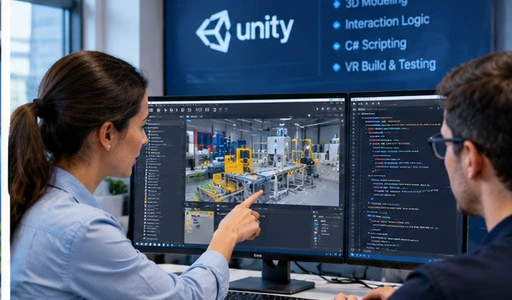
Evaluating Virtual Reality Interactive Application Development Solutions
Custom-Built Apps Versus Off-the-Shelf Options
You can start using ready-made software right away, and it costs less at first. In general, it works well for things like watching 3D movies or learning about safety. There are times when you need your own gear, your own way to control things, or your own brand. It takes longer to make custom apps, but they work better with how you work. For instance, it takes three to six months to make a high-fidelity business game. I look at four things to compare the two: how much it costs at first, how long it takes to set up, how it grows as more people sign up, and how easy it is to connect to other systems. When you're not sure about something, a pilot with one situation can often answer all of your questions.
Comparing Platforms and Development Tools
The cost and reach will depend on the platform you pick. It has a lot of coders and works on a lot of devices. If you want to make images with a lot of detail, you'll need better tools for Unreal Engine. Platforms that run in browsers are different. For this, Khronos released WebGL version 2.0 in 2017. This lets them draw in 3D in Chrome or Edge without having to open a client. That path works well in classrooms and training rooms with a variety of computers. Networking is added by multi-user projects, and tools like Photon and Mirror take care of the shared state between users. Pick a tool that works with the area, your budget, and the people who will be using it.
Choosing a Development or Training Partner
A good partner shows examples of similar projects they've worked on before, names the people who will work on the project, and talks about how changes will work after the project is done. Who owns the source files? What computers does the build work with? What kind of help is available after the delivery? Plan and site visits mostly depend on where you are, so set up times to meet early on. This is something that E.C.R. Academy thinks about from the point of view of training. Everything from PLC programming to metaverse virtual simulation is covered in our virtual reality interactive application development course. It meets the technical standards around the world and is taught by engineers and academics who work in the area. It's mostly about industrial scenes that you can see in your computer and that are linked to PLCs. You can use many of the scene and conversation skills you learn to work with headsets.
Real-World Examples and Use Cases of VR Interactive Applications
Manufacturing and Industrial Automation
You try control logic in virtual worlds before you use it on real tools. Grieves and Vickers wrote in 2017 that a digital twin is a digital copy of a real thing or system. That idea is used in two projects in our class. The smart factory material sorting system is made up of learners putting together conveyor belts, robotic arms, sensors, and control logic. After that, a PLC program is used to run the virtual line. The multi-liquid mixing system has heating units, level monitors, pipeline valves, and moving motors that are made by this company. The PLC and computer system can exchange information in real time, allowing the virtual system on the screen to respond to PLC signals without directly operating a physical factory line.
Architecture and Design Reviews
Architects and builders use full-size 3D models to look over plans with each other. People stand where the building will go to check the views and see if there are any issues with how the structure and building systems will work together before they start building. Fixing a clash in a model usually costs less than fixing it in real life. People on the team who aren't in the same room can still talk while walking the same model during multi-user meetings. Graphics that look real can help users rate materials and lights, and statistics built in can keep track of what people look at and pick. These are examples of how the technology is used in general, not examples from a certain client.
Trade Shows and Product Demos
To ship to a trade show, something might be too big, too expensive, or too new. But it can still be shown in VR. It is possible to open screens on a virtual machine and watch it do regular things. Then, sales teams can think about which features interested people and bring them up in follow-up calls. People who missed it can see a different version in a computer. Anyone in a booth can hear the same scene. Not being ready is the biggest risk. The staff should have practiced a short demo script and have a backup plan in case one of the speakers breaks.
Procurement and Budget Planning for Virtual Reality Interactive Application Development
Cost Components
There are four parts to VR funds. Part of design is planning use cases, Contact rules, and rough sketches of the interface. As part of development, you work on the engine, 3D assets, and ties that connect to data sources or controls. To test the devices, keep an eye on the frame rate, and see how comfortable the headsets are, you need real devices or test computers. As part of deployment, there is setup, setting up user accounts, writing up documents, and teaching staff. A lot of beginners don't do well with the last two. Prices are hard to say because they depend on how much is needed, how many assets need to be protected, and how many devices need to be supported. Providers can price these four parts separately, and then you can compare them line by line.
Pricing Models and Contract Terms
Fixed-price or time-and-materials arrangements are what sellers offer most of the time. A set price works when the scope is clear and not likely to change. When there are open questions, time-and-materials works well, but they should be limited in how much they can spend and have to answer questions regularly. There are some companies that sell licenses as well. Schools can use these if they want to have that class use the same course materials. In the contract, you should list the project's goals, due dates, quality checks, and who owns the source files. Make it clear what a change order is and how much it costs. When terms are clear, there is no need for arguments about whether or not a feature was put in.
Outsourcing and Building Internal Skills
People who work for you will save you time on your first job, but you still need someone in-house to check the work. Ask for a small test run that costs money and always write down what you say. They train their own staff too, so they don't have to wait for a provider to make changes. Our class is based on the Industrial Digital Twin Engine Platform. You can use it on your computer. It was made with HTML5, WebGL, and B/S design. It has parts for publishing, setting up communication, programming PLCs, making industrial scenes, and programming interactions. An i5 processor, 8 GB of memory, and a graphics card that can handle WebGL are what you should have.
Conclusion
Virtual reality interactive application development combines 3D engines, tracking hardware, and interaction logic so that users can practice, review, and show what they know in a digital space. To begin, there are easy projects and the basics of engines. The next step is to connect scenes to real equipment data. From setting goals to designing, prototyping, developing, and testing, it's important to pay close attention to comfort, delay, and the stability of the frame rate. Users should look at both custom and off-the-shelf options, platforms based on how many devices they can connect to and the hardware they need, and partners based on how experienced they are and how they handle customer service. In real life, it's useful to make things, look over ideas, and show off finished goods. The costs of planning, developing, testing, and deploying should be broken down into separate costs in a good budget. The contract should also be made clear. When the company improves its skills, it has more power after the release.
FAQ
1. Can I take this course with no background?
Yes. It's easy for people who have never taken a class before to learn in this class. It starts with the basics and then moves on to hands-on exercises. It keeps the learning bar low so that each lesson builds on the last. The course also introduces how virtual systems can communicate with external equipment and data sources.
2. What computer do I need?
For browser-based applications, an up-to-date version of Chrome or Edge, at least 8 GB of memory, an i5 CPU, and a graphics card that can handle WebGL are recommended. Actual requirements may vary depending on the complexity of the 3D scenes and the specific application.
3. How do I get course materials?
You will get a set of materials for the course that include 3D models of factory equipment, examples of PLC programs, and designs for virtual scenes. You learn where to find industrial products and how to use them on your own. You can either make your own supplies or use materials that have been approved for your projects.
Start Your Virtual Reality Interactive Application Development Path with E.C.R Academy
E.C.R. Academy makes it easy for schools, companies, and industry groups to learn useful skills through our virtual reality interactive application development course. This course covers everything from PLC code to virtual simulation. Need a virtual reality interactive application development company to help you get licenses, train your team, or make a shared program? You can email your goals to ecr2008@enteredu.com or use enteredu.com to find out more. The next steps will be sent to you by our team.
References
1. Khronos Group. The OpenXR Specification, 2024.
2. Khronos Group. WebGL 2.0 Specification, 2017.
3. Kennedy, R. S., Lane, N. E., Berbaum, K. S., & Lilienthal, M. G. "Simulator Sickness Questionnaire: An Enhanced Method for Quantifying Simulator Sickness." The International Journal of Aviation Psychology, 1993.
4. Merchant, Z., Goetz, E. T., Cifuentes, L., Keeney-Kennicutt, W., & Davis, T. J. "Effectiveness of Virtual Reality-Based Instruction on Students' Learning Outcomes in K-12 and Higher Education: A Meta-Analysis." Computers & Education, 2014.
5. Grieves, M., & Vickers, J. "Digital Twin: Mitigating Unpredictable, Undesirable Emergent Behavior in Complex Systems." Transdisciplinary Perspectives on Complex Systems, Springer, 2017.
6. LaViola, J. J. "A Discussion of Cybersickness in Virtual Environments." ACM SIGCHI Bulletin, 2000.


_1781601799781.webp)